

Clearstory's powerful integration with Autodesk Forma gives all stakeholders a streamlined view of Change Order Requests and Time and Material Tags and allows them to be pushed effortlessly to Autodesk PCOs.
Align Stakeholders Across Platforms.
Instantly.
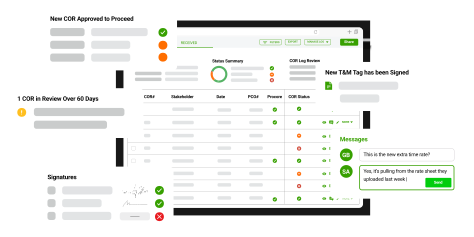
Clearstory’s integration with Autodesk Forma creates a seamless way to instantly push Clearstory digital T&M Tags and Change Order Requests to Autodesk Forma. See status in real-time and determine at-a-glance which items have been pushed to Autodesk Forma and assigned a PCO number.
Benefits of
Clearstory + Autodesk Forma

Eliminate manual data entry
Reduce processing time and simplify Change Order communication in real-time with Clearstory's shared, Universal COR Log that syncs data effortlessly to Autodesk Construction Cloud. Push to an existing PCO or create one from scratch in Clearstory.
Ensure forecast is up-to-date
By capturing all of your Change Order risk in Clearstory’s cloud-based log you can immediately see status in real-time, eliminating the need to reconcile data, and providing instant visibility into what has been pushed to Autodesk Forma and assigned a PCO number.
Safeguard revenue and cash flow
Easily communicate and resolve out-of-contract work to avoid contentious negotiations between stakeholders.
Instantly navigate between programs
Seamlessly jump into an Autodesk PCO from a link inside Clearstory for quick access to the right information every time.
Filter views based on project or status
Search for all CORs that have either been assigned or not assigned to Autodesk Forma to see which CORs have not yet been forecasted.
To learn how to connect Clearstory with Autodesk Forma and how to push CORs to Change Events, visit our Knowledge Base.
Request a Demo
See the Clearstory + Autodesk Forma in Action
